
SureForms Review: The WordPress Form Plugin I Actually Use

Written By: TaKenya
Published: May 19, 2026
Modified: September 24, 2026

I refreshed this SureForms review with the features added since my original post, updated pricing, new pros and cons, and my ratings after months of real use on my own site and client sites.
Ease of use
Features
Functionality
Integrations
Support/Documentation
Price/Value
Pros
Cons

The links in this post may be affiliate links. That means that if you click them and make a purchase, this site makes a commission. It will have no impact on the price you pay or the experience of your purchase.
SureForms is the form plugin I run on the Studio117 Creative website, it is what I recommend to most of my clients, and after months of daily use, I am even happier with it than when I first wrote this review.
If your contact form is the front door to your business, it needs to work every time, without friction, and without costing you more than it should. SureForms delivers on all three.
When I first published this review, I gave a 4.5 on my original SureForms Review. Since then, the SureForms team has shipped update after update, added features I now use every week, and made my job of moving clients over to it a whole lot easier.
So this refresh comes with a bump to a nearly perfect score, and I want to walk you through exactly why.
What Is SureForms?
SureForms is a WordPress form plugin built by Brainstorm Force, the team behind the Astra theme, Spectra, and OttoKit. It launched in late 2024 and was designed from the start to work inside the WordPress block editor instead of in a separate builder screen.
You can build anything from a simple contact form to multi-step intake forms, payment forms, quizzes, and calculators. And unlike a lot of form plugins, every paid plan gets every feature. The only thing that changes between plans is how many websites you can use it on.
What Has Changed Since My Original SureForms Review
The biggest thing I want you to know: SureForms is one of the most actively developed plugins I use.
Between mid-June and mid-September 2026 alone, the team released eight updates. That is roughly one every week or two.
Here is why that matters for you. A plugin that is actively maintained is a plugin that keeps up with WordPress, fixes bugs quickly, and patches security issues before they become your problem.
Several of those recent releases included security fixes credited to outside researchers who reported them responsibly, which tells me the team takes security seriously and responds fast.
A few of the updates that stood out since my original review:
- One-click form migration from Contact Form 7, WPForms, Gravity Forms, and Ninja Forms
- Retry failed webhooks and integrations right from the activity log, so nobody has to resubmit a form because a connection timed out
- Payment event triggers for Stripe and PayPal that can grant or remove access in memberships and courses, or update your CRM automatically
- Views and conversion rates for every form, right in your forms list
- Submission logs you can turn on to diagnose exactly why a form is failing
- Better compatibility with caching and performance plugins like WP Rocket, LiteSpeed Cache, and Autoptimize
You can see every release on the SureForms changelog.
SureForms Features
Here is what you get with SureForms, starting with the features I use the most.
Conditional Logic
This is my favorite feature, full stop.
I use conditional logic in almost every single form I build. It lets you show or hide fields based on how someone answers, so visitors only see the questions that apply to them.
The result is shorter, cleaner forms that people actually finish.
Calculation Forms
Calculations let your form do math as people fill it out. That can be a price quote, an estimate, or a score.
I have been using calculation forms to qualify potential clients for specific services, and then using those results to start the right workflow automatically.
Built-In Form Migration
SureForms detects which supported form plugins you have installed, shows you how many forms are available, and lets you preview and import them.
If you are coming from Contact Form 7, WPForms, Gravity Forms, or Ninja Forms, you do not have to rebuild everything from scratch.
AI Form Builder
Describe the form you need in plain language, and SureForms generates it for you. It is a great starting point that you can customize from there.
Multi-Step and Conversational Forms
Break long forms into bite-sized steps, or turn a form into a chat-style, one-question-at-a-time experience. Both are great for intake forms and applications.
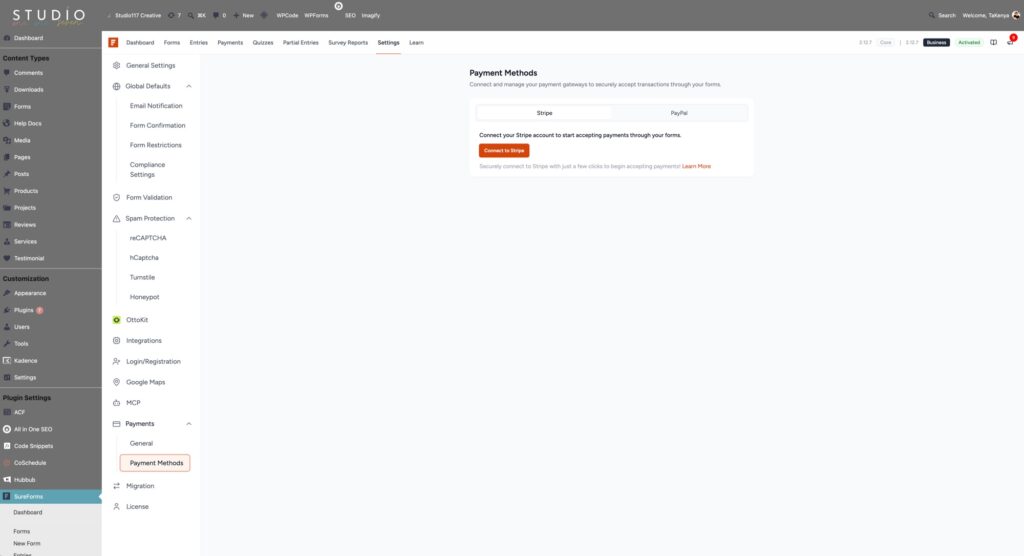
Payments
Accept payments with Stripe (available in the free version) and PayPal, including subscriptions.
Payment events can now trigger actions in connected tools, like granting course access when a payment goes through.
Advanced Form Types
SureForms also includes quizzes, surveys and polls, login and registration forms, post creation from submissions, and PDF generation from form entries.
Integrations and Automation
Connect to tools like Google Sheets, Mailchimp, HubSpot, ActiveCampaign, FluentCRM, and more, or use webhooks with Zapier, Make, and n8n.
Instant Forms, save and resume, spam protection with Cloudflare Turnstile, and form analytics round things out.
How I Use SureForms in My Business
Features lists are great, but I want to show you what this looks like in practice.
Migrating Client Forms Without Starting Over
When I first switched to SureForms, I was migrating forms manually. Field by field, form by form. It worked, but it was time I did not need to spend.
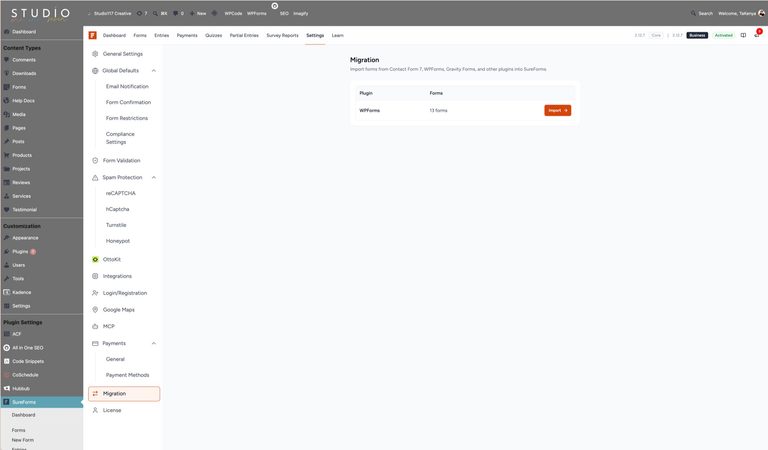
Now, SureForms recognizes which form plugins are installed on a site and offers to migrate the forms for you. For me, that turned a tedious part of every client switch into a much faster process.
My tip: after importing, always review your notifications, confirmations, conditional logic, and integrations before going live. The fields come over, but those settings deserve a second look.
Qualifying Clients With Calculation Forms
I recently built forms that use calculations to determine whether a potential client is a good fit for a specific service.
Based on their answers, the form scores them and starts the right workflow. That means the right people get the right next step automatically, without me sorting through every submission by hand.
Conditional Logic on Practically Everything
Almost every form I build uses conditional logic. Support requests, discovery calls, project inquiries. It keeps forms short for the person filling them out while still getting me every detail I need to help them.
Why I Left WPForms for SureForms
Long story short, the reason I moved was pricing logic. With WPForms, I was on an entry-level tier that gave me fewer features and limited site installations. Every time a new feature rolled out that I actually wanted, it was locked behind a higher tier. I was paying for a plan that consistently under delivered on what I needed.
SureForms simplified that equation. Every paid plan gives you full access to all features.
The only difference between tiers is how many sites you can install the plugin on. I don’t pay for features I cannot access, and I don’t want to be pushed to upgrade every time they ship something new. And with how often they ship, that matters a lot.
If you are weighing SureForms vs WPForms, that pricing difference is the heart of it. Both can build great forms. Only one gives you everything on the entry-level plan.
The Block Editor Experience
If you build and edit your WordPress site in the block editor, SureForms fits into that workflow in a way that feels intentional. The form builder works natively in Gutenberg, so creating and adding forms feels consistent with everything else you already do in WordPress.
For business owners who have built their sites in the block editor, this is a real advantage. It reduces friction, and the forms render cleanly within block-based layouts without fighting your theme. It also plays well with page builders like Elementor, Bricks, Breakdance, and Divi, with recent updates fixing compatibility issues on several of them.
SureForms Pricing
This is where SureForms continues to stand out. SureForms pricing is refreshingly straightforward, and every paid plan includes every feature.
I am on the Solo plan, and I have access to everything.
I love that a lifetime license is an option. If you know you will be using SureForms for the long haul, a one-time payment can seriously reduce your costs over time. No renewal reminders, no price increases, and every feature included.
Pricing is subject to change. Always verify current rates on the SureForms website before purchasing.
SureForms Review: Pros and Cons TLDR
What I Love
Full feature access on every plan. You are never paying more to unlock the features you actually need. This is still the number one reason I recommend SureForms.
A lifetime option. Being able to pay once and be done is a big deal for small business budgets.
Active development. Frequent releases, fast security patches, and a team that clearly listens to feedback. The plugin you buy today will be better next month.
Painless migration. The built-in migration tool takes the biggest excuse for not switching off the table.
Conditional logic and calculations. These two features together let you build forms that do real work for your business, like qualifying leads and starting workflows.
Native block editor experience. If your site is built with blocks, SureForms feels like it belongs there.
What to Keep in Mind
You will see a lot of updates. This is the flip side of active development. With releases coming every week or two, including security fixes, you need to keep your plugins updated. If you have a care plan or maintenance routine, this is easy to manage. If you do not, set a reminder.
Migrated forms need a once-over. The migration tool brings your fields over, but notifications, confirmations, conditional logic, and integrations should be reviewed before you switch your forms live.
It is still a younger plugin. SureForms is growing fast, but it does not have the years of community tutorials and third-party resources that older plugins like WPForms have built up. The official documentation is solid, so this is more of a heads-up than a dealbreaker.
The free version has limits. It is great for a basic contact form, but features like conditional logic and multi-step forms require a paid plan. Given the price of the Solo plan, I think it is worth it.
Who SureForms Is Best For
SureForms is the right fit if:
SureForms Review: FAQs
Is SureForms Worth It?
For service-based business owners running WordPress who want a capable, fairly priced form plugin that does not penalize you for using its best features, absolutely. This SureForms review reflects real, ongoing use on my own site and my clients’ sites, not a one-time test.
When I first wrote this review, SureForms was already my recommendation. Now, with how actively the team is building and improving it, I recommend it with even more confidence. That said, you know your business best. Take a look at what your forms need to do, try the free version if you want to test it out, and choose what makes the most sense for you.
Overall rating

TaKenya Hampton
Founder of Studio117 Creative, a woman-owned WordPress web design and support agency in Raleigh, NC, and the girl behind the stove and drill at the Kenya Rae Blog. A lover of WordPress and systems, I help small business owners build strategic digital foundations through web design, tech strategy, and business coaching. My goal is simple: make things look good, work well, and help business owners reach their full potential. If it helps your business run smoother and grow stronger, that is what I do.